
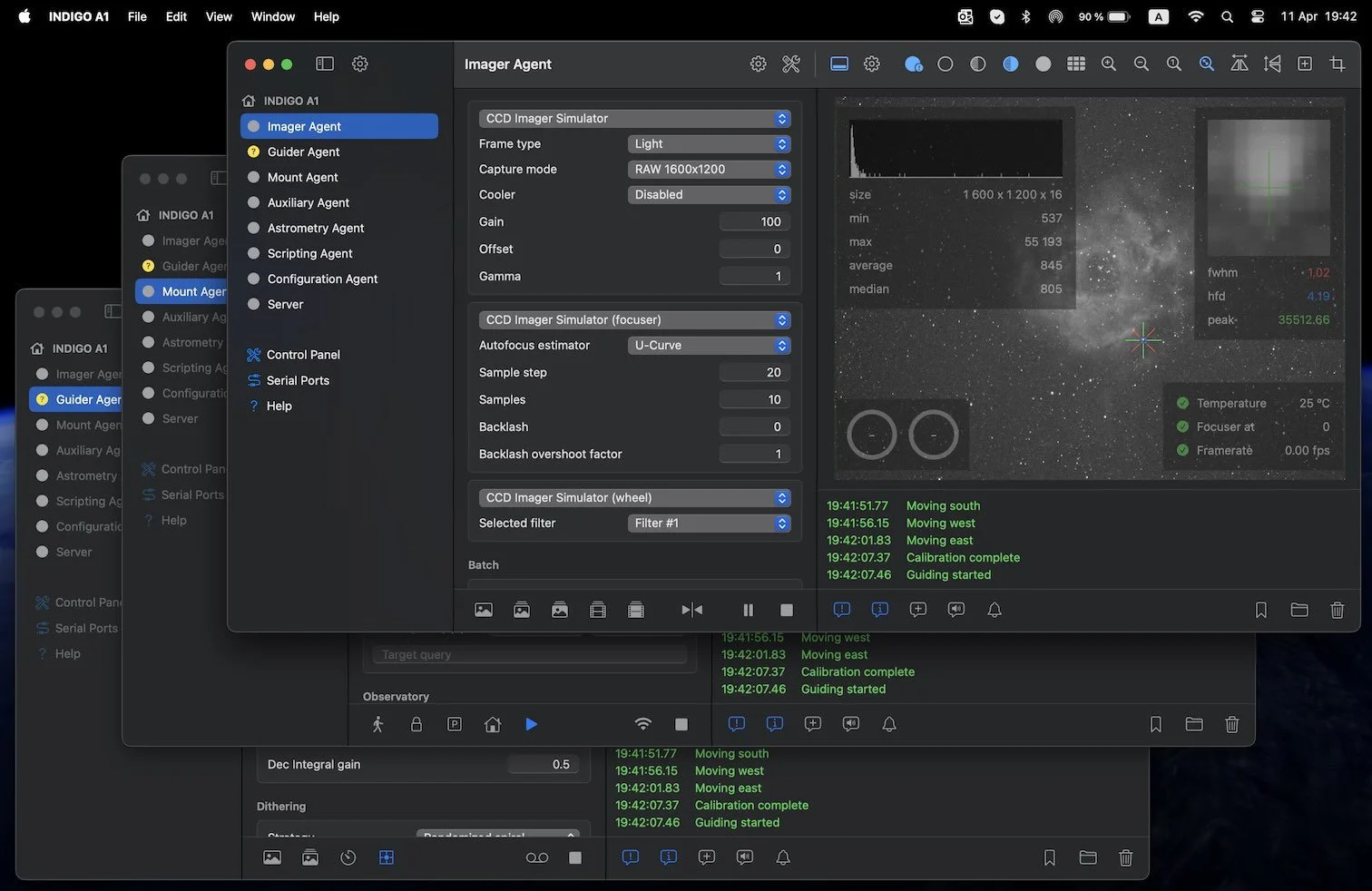
Three years of relentless development have turned CloudMakers' all-in-one imaging app into a genuine native alternative to NINA — and the architecture under the hood might be ahead of it.
Back in April 2022, I covered the initial release of INDIGO A1 — CloudMakers' ambitious move to consolidate their separate Mac astrophotography applications into a single all-in-one package. At the time, it was a promising debut but still finding its footing. Three years later, INDIGO A1 has matured into something that deserves a serious second look. It may now be the most capable native astrophotography suite available on macOS — and the way it's structured could make it the smartest investment in the Mac astronomy ecosystem.
Here's what's changed, what it can do, and how it stacks up.
What Is INDIGO A1 Today?
INDIGO A1 is a native macOS (and iOS/iPadOS) application that handles the entire imaging session workflow: camera control and image capture, autoguiding, telescope and mount control, focuser management, filter wheel operation, dome control, plate solving, and sequenced automation. It's built on the INDIGO framework — the modern successor to INDI that serves as the Mac and Linux equivalent of Windows' ASCOM driver standard.
If you've been in the Mac astronomy space for a while, you may remember CloudMakers' individual apps: AstroImager, AstroGuider, AstroTelescope, AstroDSLR, INDIGO Server, INDIGO Dashboard, INDIGO Control Panel, and INDIGO Script Editor. All of them have been retired and consolidated into INDIGO A1 version 5. This isn't just a bundle — it's a ground-up rearchitecture that fundamentally changes how the software works.
The pricing model has also changed significantly. INDIGO A1 is now a free download from the Mac App Store. The base application includes the full embedded INDIGO server, all hardware drivers, the control panel, the script editor, and simulator devices you can use to explore every feature before spending a dime. The core imaging capabilities are unlocked through in-app purchases at $24.99 per module: Imager (camera control, capture, focusing, sequencing), Guider (autoguiding with multiple drift detection algorithms), Mount (telescope/mount control with built-in planetarium), and Dashboard (configurable low-level control workspaces, iPadOS only).
A fully unlocked installation runs about $100, but the modular approach gives you genuine flexibility. If you already run PHD2 for guiding on your Mac, you could skip the guider module and save $25. If you only need camera control and don't have a goto mount, you might only need the imager module. You buy what you actually use.
The Architecture That Changes Everything
The most important thing about INDIGO A1 isn't visible in the feature list — it's the underlying agent-based architecture that separates it from traditional astronomy software.
In a conventional setup, your imaging application runs on your computer, talks to your hardware, and if your laptop goes to sleep or your WiFi drops, your session stops. The application logic and the hardware communication are tightly coupled.
INDIGO A1 works differently. CloudMakers moved from the traditional client/server model to what they call a "multi-tier agent-based architecture." In practical terms, this means the application logic — the code that actually runs your imaging sequence, controls your guiding corrections, and manages your mount — lives inside INDIGO agents that run on the server side. The INDIGO A1 interface you see on your Mac (or iPad) is a native client that configures and monitors those agents, but the agents themselves operate independently.
Why does this matter at the telescope? Three reasons.
First, you can disconnect without losing your session. Configure your imaging sequence, start it running, close your laptop, and go to bed. The agents keep working. Connect again later to check progress, download images, or make adjustments. Your session doesn't depend on a persistent client connection.
Second, when the agents and hardware drivers live in the same process on the same machine, they communicate over an internal software bus at procedure-call speed — not over a network connection. This eliminates the bandwidth bottleneck that plagues traditional remote setups where every full-resolution image has to travel across your WiFi to your client app just so the software can decide what to do next. The agent already has the image locally and can act on it instantly.
Third, because the agent code contains the core application logic, bug fixes and improvements happen in one place. The native Mac and iPad interfaces are essentially "just" the GUI layer — they present what the agents are doing in a platform-appropriate way. This is a fundamentally sound engineering approach that scales well.
If you've used or read about NINA on Windows, this agent concept will sound familiar — NINA's advanced sequencer also enables sophisticated automation that can run through complex decision trees unattended. INDIGO A1's agent architecture achieves something similar but takes it further at the infrastructure level by making the entire server-side operation independent of the client.
Core Modules: What Each One Does
Imager Agent
The imager module is the heart of INDIGO A1 for deep sky work. It controls your main imaging camera, filter wheel, focuser, and rotator. You can capture single preview frames for framing and focusing, run batch captures with configurable exposure count, duration, and delays, or build multi-target sequences with different filters, exposure parameters, and automation steps.
Focusing is handled through the imager agent with support for autofocus routines that work with electronic focusers — you'll see FWHM and HFD measurements to evaluate focus quality. The module supports output in FITS, XISF, TIFF, and JPEG formats for still capture, and JPEG/AVI or RAW/SER for video stream recording (useful for planetary or lucky imaging workflows where a dedicated tool like Laminar handles the Mac-native capture side). Note that "RAW" here refers to INDIGO's own raw format, not DSLR RAW formats like CR2 or NEF — though DSLR native RAW capture with FITS/XISF conversion is also supported.
For DSLR users: INDIGO A1 v5 absorbed the functionality of the retired AstroDSLR app. You get full tethering control for Canon, Nikon, Sony, and Fuji cameras over USB using the PTP protocol — ISO, aperture, shutter speed, BULB mode, white balance, and LiveView are all accessible.
The sequencer deserves special mention. INDIGO A1 includes a scripting-capable sequencer that lets you build automated imaging plans with multiple targets, filter changes, focusing runs, and conditional logic. Recent updates have added functions like calibrate_guiding_exposure(), clear_focuser_selection(), and clear_guider_selection() to the sequencer vocabulary, giving you programmatic control over the full imaging chain. This isn't as visually drag-and-drop as NINA's advanced sequencer, but the capability is there for users willing to learn the scripting syntax.
Guider Agent
The guider module controls your guide camera and communicates corrections to your mount through either a dedicated guide port (ST-4 style) or direct pulse guiding through the mount's serial/USB connection. It supports automatic multi-star detection — you don't need to manually select a guide star — and offers multiple drift detection and drift response algorithms.
Calibration can be automatic or manual, and the agent handles the relationship between your guide camera's orientation and your mount's axes without you needing to worry about it. Recent versions added include and exclude regions for star selection, giving you control over which parts of the guide frame are used — helpful if you have hot pixels, optical artifacts, or a bright star that's throwing off detection.
The guider agent cooperates with the imager agent for dithering (randomly offsetting the telescope slightly between exposures to reduce fixed-pattern noise in your final stack) and with the mount agent to automatically pause guiding during slews.
Mount Agent (AstroTelescope)
The mount module provides telescope and dome control along with a built-in planetarium view. The star map uses the Hipparcos Catalogue and selected NGC/IC deep sky objects locally, with online object search available through the SIMBAD service at the Strasbourg Astronomical Data Center. As of version 5.26, NASA HORIZONS support was added to all object name search fields, opening up solar system targets. The star map recently switched to stereographic projection for more accurate rendering.
You can slew to targets by searching the catalog, tapping on the star map, or entering coordinates manually. After a plate solve, you can click on a star in the solved frame to set precise goto coordinates — a workflow that experienced imagers will appreciate for precise framing.
The mount module also handles polar alignment with an overlay and dedicated UI added in version 5.25, using three-point polar alignment through the astrometry agent.
AUX Devices
INDIGO A1 can control up to four auxiliary devices per agent — power boxes (like PegasusAstro UPB /PPB, WandererBox, Lunatico controllers), weather stations (AAG CloudWatcher, Astromi.ch sensors), flat panel lights (Artesky, Optec Flip-Flat, Geoptik, Lacerta), and other devices that report data through INDIGO's property system. You can rename outlets and ports through the control panel and save configurations per profile.
Scripting
INDIGO Script is a built-in scripting language based on ECMAScript (JavaScript) with bindings to INDIGO objects and functions, executed by the Duktape engine. Scripts can run manually, on agent load/unload, or be registered as event handlers triggered by any INDIGO event. This is a powerful layer for users who want to build custom automation beyond what the standard sequencer offers — weather-based shutdown routines, conditional target switching, or integration with external systems.
Hardware Compatibility and Apple Silicon
INDIGO A1 ships with one of the broadest driver libraries in Mac astronomy software. The driver list covers cameras, filter wheels, focusers, rotators, mounts, guide ports, power controllers, weather stations, flat panels, domes, and GPS devices from dozens of manufacturers.
Cameras: ZWO ASI, QHY, PlayerOne, Atik, SBIG, Moravian Instruments, ToupTek, AltairAstro, SVBony, StarlightXpress, FLI, Apogee, Meade DSI, Orion SSAG, RisingCam/Levenhuk, MallinCam, OmegonPro, OGMA, Bresser, plus DSLR tethering for Canon, Nikon, Sony, Fuji, and Pentax via PTP-over-USB, and a generic UVC driver for USB video class cameras.
Mounts: LX200 protocol (covering Meade, 10micron, Astro-Physics GTO{target="_blank" rel="noopener"}, Avalon StarGo, Losmandy Gemini, PegasusAstro NYX-101, and OnStep), NexStar protocol (Celestron and Sky-Watcher), Takahashi Temma, iOptron, SynScan/EQDir, ZWO AM5, RainbowAstro, Vixen Starbook Ten, and Explore ScientificPMC-Eight.
Focusers: ZWO EAF, MoonLite, PegasusAstro (DMFC, FocusCube v1/2/3, Prodigy), PrimaluceLab, RigelSys nSTEP/nFOCUS, Deep Sky Dad, Baader SteelDrive II, RoboFocus, Lunatico, PlaneWave/Celestron, and more.
Other: Filter wheels from most camera manufacturers, PegasusAstro power boxes, dome controllers (NexDome, Baader, Beaver, Lunatico Dragonfly, Interactive Astronomy SkyRoof), weather sensors, and GPS devices.
The Apple Silicon Story
When INDIGO A1 first launched in 2022, several camera drivers carried "Intel only" annotations — including ZWO, QHY, SBIG, ToupTek, AltairAstro, and SVBony. This was a real limitation for anyone who had moved to an M1 or M2 Mac, requiring the app to run under Rosetta 2 emulation to use those cameras.
The situation has improved substantially. Through progressive INDIGO framework updates, Apple Silicon native support has been added for the camera SDKs that matter most to the current market. ToupTek, AltairAstro, OmegonPro, RisingCam, MallinCam, OGMA, and SVBony all gained native ARM support around INDIGO framework version 2.0.232. ZWO ASI, PlayerOne, and Moravian Instruments SDKs have also been updated. The current v5 App Store listing no longer carries "Intel only" annotations on any drivers.
A few legacy camera lines (particularly older Atik, SBIG, and QSI models) may still depend on Intel-only SDKs from manufacturers who haven't shipped ARM builds. If you're using one of these cameras, the distributed setup offers an elegant workaround: run the INDIGO server on a Raspberry Pi connected directly to your equipment at the telescope, and use INDIGO A1 on your Apple Silicon Mac purely as a client. The Pi handles all hardware communication natively, and your Mac never needs to touch an Intel driver.
Plate Solving: The One Extra Download
Plate solving — the ability to analyze a captured image, identify the star field, and determine exactly where your telescope is pointed — is integral to modern astrophotography. INDIGO A1 has full plate solving support built into its workflow, including a dedicated astrometry agent with a solver tab, polar alignment overlay, and precise goto from solved frames.
However, the actual plate solving engine ships as a separate application: INDIGO Astrometry, a free download from CloudMakers' website. This is a native macOS port of the astrometry.net system, and it needs to be running in the background while you use plate solving in INDIGO A1. The separation exists because astrometry.net's license doesn't permit bundling it inside the App Store build of INDIGO A1.
Setup is straightforward: download and install INDIGO Astrometry, use its built-in Index Manager (or the INDIGO Control Panel's Astrometry Agent settings) to download the index files appropriate for your telescope's field of view, and launch it before your imaging session. Once running, INDIGO A1 detects it automatically. You'll typically only need one to three index files based on your FOV, and solving a properly configured image takes under 10 seconds on a desktop Mac.
If you don't want to use the local solver, INDIGO A1 also supports the public astrometry.net web service — you'll need an API key and an internet connection, and images are compressed to JPEG before upload to save bandwidth. It works, but the local solver is faster and doesn't require connectivity in the field.
One note: INDIGO previously had an ASTAP agent for using ASTAP as an alternative plate solver, but this has been deprecated and removed. The recommended path is the Astrometry app. ASTAP remains a great standalone tool on Mac for stacking and solving, but it doesn't integrate with INDIGO A1's workflow.

INDIGO A1 vs. NINA: How They Compare
For Mac users eyeing NINA on Windows with envy, INDIGO A1 is the closest native equivalent — and the comparison is worth making honestly.
Free base, ~$100 full unlock
Integrated guider module
Agent-based disconnect/reconnect
Native iPad remote client
80+ built-in INDIGO drivers
Script-based sequencer
Free and open source
Relies on PHD2 for guiding
Visual drag-and-drop sequencer
Remote via RDP/VNC
ASCOM driver ecosystem
Large plugin marketplace
Platform and Pricing
NINA is free, open-source, and Windows-only. To run it on a Mac, you need either Boot Camp (Intel Macs only, no longer supported on Apple Silicon), a Windows VM with USB passthrough (Parallels or VMware, with varying reliability for astronomy hardware), or a dedicated Windows machine. INDIGO A1 is native macOS, iPadOS, and iOS — no emulation layers, no driver compatibility worries, no second operating system to maintain. The base app is free; full unlock costs about $100 in module purchases.
Imaging and Sequencing
Both applications handle the core imaging workflow: camera control, batch capture, filter management, autofocus, and multi-target sequencing. NINA's Advanced Sequencer is widely regarded as one of its strongest features — a visual, drag-and-drop system with containers, triggers, conditions, and a rich plugin ecosystem that can add weather monitoring, flat panel automation, and more. INDIGO A1's sequencer is capable but more script-oriented. It handles multi-target sequences with filter changes and automation, and its ECMAScript-based scripting engine allows sophisticated custom workflows. But the learning curve for complex sequences is steeper than NINA's visual approach.
Guiding
NINA doesn't include a built-in guider — it relies on PHD2, which runs as a separate application and communicates with NINA via a server connection. This works well and PHD2 is excellent, but it's another application to install, configure, and keep running. INDIGO A1 includes guiding as an integrated module (the $24.99 guider purchase). The guider agent handles calibration, multi-star detection, dithering coordination with the imager, and guiding pause during slews — all within the same application. That said, PHD2 does run on macOS, so you have the option to use it alongside INDIGO A1 if you prefer.
Plate Solving
NINA supports multiple plate solving backends: ASTAP, local astrometry.net, PlateSolve2, and the astrometry.net web service. INDIGO A1 uses its Astrometry app (a native astrometry.net port) as the primary solver and the astrometry.net web service as a fallback. Both approaches work well. NINA has more solver options; INDIGO A1's single recommended solver is free and effective.
Hardware Support
NINA uses ASCOM drivers on Windows, which generally have the broadest manufacturer support — virtually every astronomy hardware vendor ships Windows ASCOM drivers first. INDIGO's built-in driver stack is extensive (80+ drivers) and covers the most popular equipment, but there are niche devices where a Windows ASCOM driver exists but no INDIGO driver does. The gap has been narrowing steadily with each INDIGO framework update.
Remote Operation and Multi-Platform
This is where INDIGO A1's architecture genuinely shines. The agent-based system with disconnect-and-reconnect capability, combined with native iPad and iPhone clients, gives you a remote operation experience that NINA doesn't match out of the box. You can set up your session on your Mac, walk inside, and monitor from your iPad on the couch. NINA users typically achieve remote operation through RDP, VNC, or dedicated remote desktop solutions — it works, but it's a different experience than a purpose-built native client.
Community and Ecosystem
NINA has a large, active community, extensive documentation, video tutorials for virtually every workflow, and a thriving plugin ecosystem. INDIGO A1 has a smaller but dedicated community centered on the CloudMakers bulletin board (bb.cloudmakers.eu), responsive developers who ship updates frequently, and documentation that — while thorough — assumes more baseline familiarity than newcomers may have. This is a genuine consideration: if you're new to astrophotography and learn primarily from YouTube tutorials, you'll find far more NINA content than INDIGO A1 content.
The Verdict
If you're committed to macOS and don't want to maintain a Windows machine or VM, INDIGO A1 is the clear choice — it's the most capable native option available and it's been improving at a remarkable pace. If you're already invested in a Windows imaging setup and considering a switch, INDIGO A1 can do most of what NINA does, with some workflow differences and a smaller community. Where INDIGO A1 genuinely leads is in its native multi-platform client experience and its agent architecture's independence from client connectivity.
Deployment Options
INDIGO A1 supports three deployment configurations, each suited to different situations.
Standalone Mac
The simplest setup: connect your telescope equipment directly to your Mac via USB, launch INDIGO A1, enable the appropriate drivers in the Server preferences, and go. Everything runs in a single process on one machine. This works well with a MacBook in the field or a Mac Mini at a permanent observatory. The embedded INDIGO server handles all hardware communication locally.
Mac + Raspberry Pi (Distributed)
This is the setup that experienced imagers often gravitate toward. Install INDIGO Sky — CloudMakers' free Linux distribution — on a Raspberry Pi connected to your telescope equipment at the scope. The Pi runs the INDIGO server with all your hardware drivers, while INDIGO A1 on your Mac connects over your local network as a client.
The advantages are significant: your Mac can be inside, warm and dry, while the Pi handles USB communication with zero cable length concerns. The agent architecture means the Pi keeps running your session even if your Mac disconnects. And since the Pi runs Linux ARM drivers natively, any remaining Apple Silicon driver compatibility questions become irrelevant — the Mac is just a client and never touches the hardware directly.
iPad as Remote Client
INDIGO A1 runs on iPadOS (without the built-in server feature) and can connect to any INDIGO server on your network — whether that's a Mac running INDIGO A1 with its embedded server, or a Raspberry Pi running INDIGO Sky. This gives you genuine couch-control capability with a native tablet interface. The Dashboard module (an in-app purchase) is included specifically for iPadOS, providing configurable workspaces for monitoring and control.
iOS (iPhone) is also supported but with additional limitations given the screen size.
<!-- SCREENSHOT: INDIGO A1 running on iPad showing the remote client connected to an INDIGO server --> <!-- INSERT: Code Block 9 — DSP Remote Partner Block -->

Who Is INDIGO A1 For?
If you're new to astrophotography and use a Mac, INDIGO A1 is worth downloading just to explore. It's free, the simulator devices let you learn the interface without any hardware connected, and you can make purchasing decisions about individual modules as your needs become clear. The learning curve is real — the documentation assumes some familiarity with astrophotography concepts and INDIGO's property-based architecture — but App Store reviewers consistently note that the capability is there once you invest the time.
If you're an experienced imager who's been running Windows for NINA or SGP, INDIGO A1 represents a viable path to going Mac-native for your entire imaging workflow. The feature set covers the essentials, the hardware support is broad, and the agent architecture offers capabilities that are genuinely ahead of the curve. The transition will require relearning workflows and accepting a smaller community, but the payoff is a single-platform setup with no emulation layers.
If you're already using KStars/EKOS on Mac, INDIGO A1 offers a native alternative that's purpose-built for macOS rather than ported from Linux. The two applications can actually coexist — EKOS has partial INDIGO compatibility — but INDIGO A1's tighter integration with the INDIGO driver stack and its native macOS interface are meaningful advantages.
If you run a remote observatory, the distributed architecture with INDIGO Sky on a Raspberry Pi and INDIGO A1 on your Mac or iPad is one of the cleanest remote imaging setups available on any platform. The disconnect-and-reconnect workflow is exactly what you want for overnight unattended operation.
The Bottom Line
INDIGO A1 in 2025 is not the same application I briefly covered in 2022. It has evolved from a promising consolidation of separate tools into a genuinely mature, actively developed imaging suite that handles the full astrophotography workflow natively on macOS. The free-to-try model removes the financial risk of exploration, the modular pricing lets you invest incrementally, and the agent-based architecture provides a technical foundation that's built for how modern astrophotographers actually work — often remotely, often unattended, often from multiple devices.
It's not perfect. The documentation could be more welcoming to newcomers. The community is smaller than NINA's. The sequencer is powerful but less visually intuitive. Some niche hardware still lacks drivers. These are real considerations.
But if you're a Mac user who wants to image from macOS without compromise, INDIGO A1 is the strongest case that's ever been made that you can. CloudMakers has spent over a decade building toward this, and the result is software that doesn't just work on a Mac — it was designed from the ground up to take advantage of the platform.
INDIGO A1 is a free download from the Mac App Store with in-app module purchases at $24.99 each. It requires macOS 13.0 or later. The companion INDIGO Astrometry plate solving app is a free download from cloudmakers.eu. For community support, the CloudMakers bulletin board at bb.cloudmakers.eu is the primary resource.
Mac Observatory is reader-supported. When you purchase through links on our site, we may earn an affiliate commission.